 Sweet Georgie Learns
The power of GitHub Pages and Jekyll
“All software developers should have their own blogs, regardless of how much experience they have. We should all share our experiences and findings and help to create a great community of professionals.”
– Sandro Mancuso in “The Software Craftsman”
Please forgive me starting this post with a quote. I usually hate this pretentious move, but it really surprised me, when I read the book. In my opinion, blogs were always something for people with exceptional expertise. The idea that everyone should write a blog, at least for themselves, initially caught me off guard. However, over the years, the idea has stuck with me, and that’s why I’m excited to document my hopefully long journey here.
I had some reservations since I had never hosted a website before and had no idea about the details. Fortunately, thanks to a friend, I found a very straightforward solution that I also use for this blog: Github Pages + Jekyll.
I probably don’t have to tell any developers about GitHub anymore. But the concept of pages was new to me. You create a simple repository with the name $USERNAME.github.io and GitHub hosts it as a public website at https://$USERNAME.github.io (replace $USERNAME with your own GitHub username). With this, the hosting is already done. Free of charge. What more could you want?
Yeah, that’s right: a custom domain, so that you can pretend professionalism to dorks like me. But again, GitHub Pages is the simple solution. You buy a cheap domain and can use it to display the GitHub Pages content. All that is needed is to enter the custom domain in the repository under Settings -> Pages -> Custom domain:
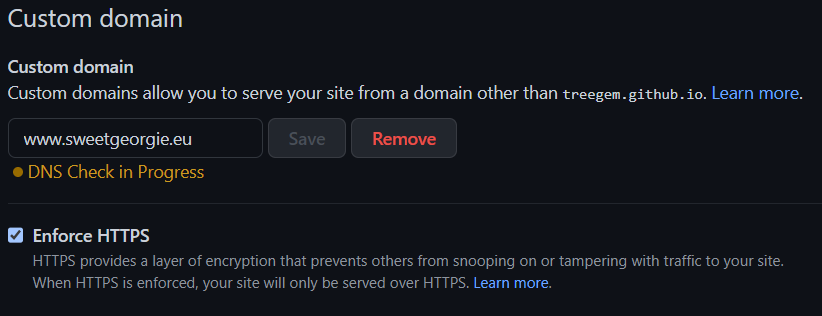
At the DNS provider you only have to create a CMAKE entry that points www.sweetgeorgie.eu to $USERNAME.github.io -> done.
Now you have to wait for the DNA propagation, which can usually take 30 min to 1 day. I stupidly did not do this and therefore still had a wrong IP in the DNS cache, which made me think for a day that it had not worked. What helps is to use a DNS checker. I used whatsmydns for this. This shows how far certain DNS changes of a domain are already propagated.
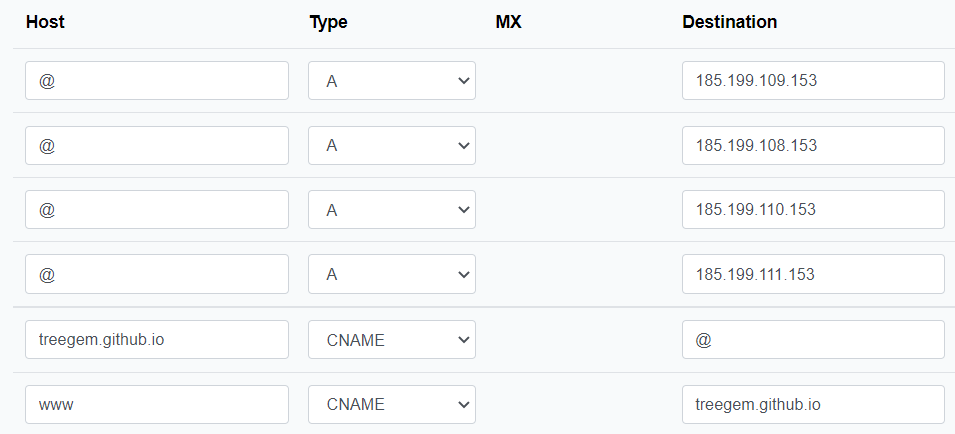
If you want to have an apex domain as a custom domain, you have to make a few more settings in the DNS provider and have them propagated as well. According to my non-expert understanding, apex domain means that you can leave out the “www” at the beginning of the URL and still get the correct page.
My final settings look like this:
Since I got the domain as cheap as possible, there was no email address included initially. However, I could deliver this quite stress-free via Zoho Mail. All you need is your own domain and a few more settings in the DNS provider.
So this blog is good to go and all that is missing now is content : )